from Pocket http://ift.tt/1FvqQ7Z
This Hibernate (or JPA 2) Persistence Annotations Tutorial contains overview of all important annotations which you may need while annotating your java POJOs to make them act as persistent JPA entities.
from Pocket http://ift.tt/1FvqQ7Z
This Hibernate (or JPA 2) Persistence Annotations Tutorial contains overview of all important annotations which you may need while annotating your java POJOs to make them act as persistent JPA entities.
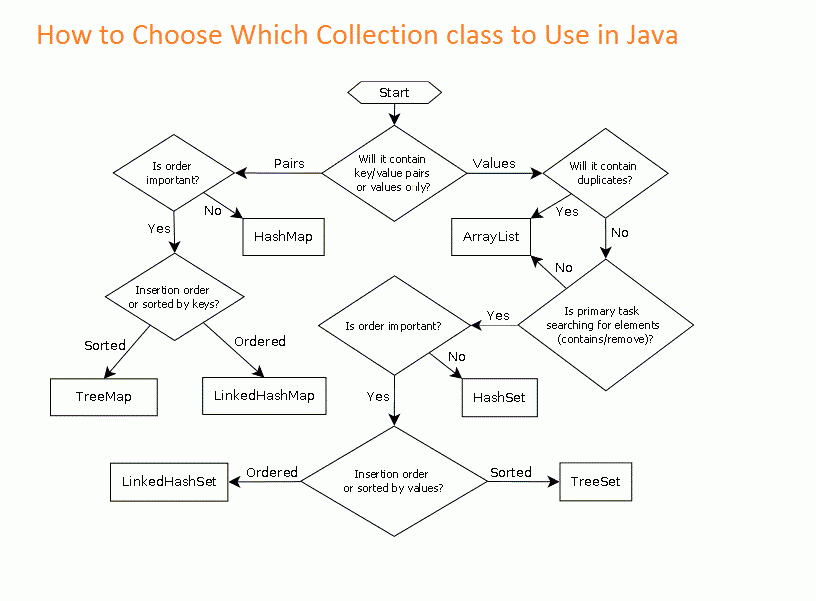
A simple guide to java collections. With this guide you will always know what structure to use regarding your needs.
Thanks.
Posted from WordPress for Android
from Pocket http://ift.tt/1poOQBY
CDI events are one of the shiniest feature in the CDI specification. They are a easy to understand and use and are a straight forward implementation of the Observer Design Pattern.
from Pocket http://ift.tt/1sRGAJO
The rules are (from memory): Bean has a @LocalBean annotation -> bean has a no-interface view Bean has a @Local annotation -> bean has a local view Bean has a @Remote annotation -> bean has a remote view Bean has no view annotations, but directly implements an interface which has a @Local annotatio
In this post I will show you how to decouple event producer from the event consumers (aka async events).


|
1 2 3 4 5 6 7 8 9 10 11 12 13 14 15 16 17 18 |
@LocalBean @Stateless public class MyEJB { @Inject @InForeground private Event<BaseEvent> event; /** * fires the @InForeground event * * @throws InterruptedException */ public void sendEvent() throws InterruptedException { event.fire(new MyEvent("Hello world event", new Date())); Thread.sleep(5000); } } |
|
1 2 3 4 5 6 7 8 9 10 11 12 13 14 15 16 17 18 19 20 21 22 23 24 25 26 27 28 29 30 31 32 33 34 35 36 37 38 39 40 41 42 43 44 45 46 47 48 49 50 51 52 53 54 |
@Stateless public class BackgroundEventSender implements BackgroundEventSenderItf { @Resource(mappedName = "myConnectionFactory") // the JNDI name for this connection factory private ConnectionFactory connectionFactory; @Resource(mappedName = "myQueue") // JNDI name for this queue private Queue backgroundEventQueue; private Connection connection; private Session session; private MessageProducer producer; @PostConstruct public void init() { try { connection = connectionFactory.createConnection(); session = connection.createSession(true, Session.AUTO_ACKNOWLEDGE); producer = session.createProducer(backgroundEventQueue); } catch (JMSException ex) { throw new RuntimeException(ex.getMessage(), ex); } } @PreDestroy public void destroy() { try { if (connection != null) { connection.close(); } } catch (Exception ex) { // todo: handle the exception } } /** * sends the foreground event to the queue with the help of the producer object * * @param event */ @Override public void event(@Observes @InForeground BaseEvent event) { try { ObjectMessage msg = session.createObjectMessage(); msg.setObject(event); producer.send(msg); } catch (JMSException ex) { throw new RuntimeException(ex.getMessage(), ex); } } } |
|
1 2 3 4 5 6 7 8 9 10 11 12 13 14 15 16 17 18 19 20 21 22 23 24 25 26 27 28 29 30 31 32 33 34 35 36 |
@MessageDriven(mappedName = "myQueue", activationConfig = { @ActivationConfigProperty(propertyName = "acknowledgeMode", propertyValue = "Auto-acknowledge"), @ActivationConfigProperty(propertyName = "destinationType", propertyValue = "javax.jms.Queue") }) public class BackgroundEventDispatcher implements MessageListener { public BackgroundEventDispatcher() { } @Inject @InBackground private Event<BaseEvent> event; /** * dispatches the message received from the queue and fires a new event (now with the @InBackground qualifier) * * @param message */ public void onMessage(Message message) { if (!(message instanceof ObjectMessage)) { throw new RuntimeException("Invalid message type received"); } ObjectMessage msg = (ObjectMessage) message; try { Serializable eventObject = msg.getObject(); if (!(eventObject instanceof BaseEvent)) { throw new RuntimeException("Unknown event type received"); } BaseEvent evt = (BaseEvent) eventObject; this.event.fire(evt); } catch (JMSException ex) { throw new RuntimeException(ex.getMessage(), ex); } } } |
|
1 2 3 4 5 6 7 8 9 10 11 12 13 14 15 |
@Stateless public class EventConsumer implements EventConsumerItf { /** * consumes the event sent by the JMS queue * * @param event */ @Override public void afterMyEvent(@Observes @InBackground MyEvent event) { System.out.println("Event message: " + event.getData()); System.out.println("Event time: " + new SimpleDateFormat("yyyy.MM.dd @ HH:mm:ss").format(event.getEventTime())); } } |
The event object it’s just a POJO like this one:
|
1 2 3 4 5 6 7 8 9 10 11 12 13 14 15 16 17 18 19 20 21 22 23 24 25 26 27 |
public class MyEvent extends BaseEvent { private String data; private Date eventTime; public String getData() { return data; } public MyEvent(String data, Date eventTime) { this.data = data; this.eventTime = eventTime; } public void setData(String data) { this.data = data; } public Date getEventTime() { return eventTime; } public void setEventTime(Date eventTime) { this.eventTime = eventTime; } } |
You can get the full code from github. Thank you!
Feel free to comment.
In this post I will show you another interesting example of Java Dynamic Binding…

Did you expect such behavior? Feel free to comment. Thanks.
from Pocket http://ift.tt/1i8gtba
En esta entrada explicaremos como crear un Web Server que sirva una API RESTful usando para ello la tecnología de Node.js y todo el JavaScript que podamos, incluyendo la base de datos (MongoDB) y el plugin para conectarnos a ella y mapear los modelos (Mongoose).
In this post I will show you how to produce a CDI event and how to handle it even if it is deployed in another application.
The Event class
|
1 2 3 4 5 6 7 8 9 10 11 |
public class LoggerEvent { private String message; public LoggerEvent(String message) { this.message = message; } public String getMessage() { return message; } } |
A simple JSF Page
|
1 2 3 4 5 6 7 8 9 10 11 |
<?xml version='1.0' encoding='UTF-8' ?> <!DOCTYPE html PUBLIC "-//W3C//DTD XHTML 1.0 Transitional//EN" "http://www.w3.org/TR/xhtml1/DTD/xhtml1-transitional.dtd"> <html xmlns="http://www.w3.org/1999/xhtml" xmlns:h="http://xmlns.jcp.org/jsf/html"> <h:head> <title>CDI Event Example</title> </h:head> <h:body> <h1>#{controller.message}</h1> </h:body> </html> |
This page only shows a simple message from the backing bean (the call to the bean produces the bean’s initialization).
Backing Bean
|
1 2 3 4 5 6 7 8 9 10 11 12 13 14 15 16 17 18 19 20 21 22 23 24 |
import javax.annotation.PostConstruct; import javax.enterprise.context.RequestScoped; import javax.enterprise.event.Event; import javax.inject.Inject; import javax.inject.Named; @Named @RequestScoped public class Controller { @Inject private Event<LoggerEvent> event; private String message = "CDI Events Example"; @PostConstruct public void init() { event.fire(new LoggerEvent("Hello from CDI events")); } public String getMessage() { return message; } } |
Here we Inject an event (LoggerEvent) via CDI Inject annotation. Then inside the init method annotated with PostConstruct we fire the event with a new instance of the event. This is the simplest way to fire a CDI event. No matter who are listening to this event will be notified.
A simple Logger Event Handler
|
1 2 3 4 5 6 7 8 9 10 11 12 |
import java.util.logging.Level; import java.util.logging.Logger; import javax.ejb.Stateless; import javax.enterprise.event.Observes; @Stateless public class LoggerEventHandler { public void log(@Observes LoggerEvent event) { Logger.getLogger("LoggerEventHandler.class").log(Level.INFO, event.getMessage()); } } |
This class will listen for events annotated with the keyword @Observes. Because of this, it will execute the method. In this case it will print to the console a log message passed to the constructor of the event instance when it was created: Hello from CDI events as you can see in the next picture.
Result (console result)

AS you can see, it’s just that simple to create a CDi event and listen to it. This technique uses the Observer design pattern here with the help of @Observes annotation.
Feel free to comment. Download the souce code CDIEvents.
Thanks.
In this post I will show you how to validate date ranges with JAVA annotation.

XHTML page:
|
1 2 3 4 5 6 7 8 9 10 11 12 13 14 15 16 17 18 19 20 21 22 23 24 25 26 |
<?xml version='1.0' encoding='UTF-8' ?> <!DOCTYPE html PUBLIC "-//W3C//DTD XHTML 1.0 Transitional//EN" "http://www.w3.org/TR/xhtml1/DTD/xhtml1-transitional.dtd"> <html xmlns="http://www.w3.org/1999/xhtml" xmlns:h="http://xmlns.jcp.org/jsf/html" xmlns:f="http://xmlns.jcp.org/jsf/core"> <h:head> <title>Facelet Title</title> </h:head> <h:body> <h1>Simple Date Range Validation with Annotation</h1> <h:form> <h:messages style="color: red" /> <h:outputText value="First Date" /><br /> <h:inputText value="#{simpleDateRangeController.dto.startDate}" > <f:convertDateTime pattern="yyyy-MM-dd" /> </h:inputText><br /> <h:outputText value="Second Date" /><br /> <h:inputText value="#{simpleDateRangeController.dto.endDate}" > <f:convertDateTime pattern="yyyy-MM-dd" /> </h:inputText><br /> <h:commandButton value="submit" action="#{simpleDateRangeController.action()}" /> <br /> <h:commandLink value="next" action="multipledaterange" immediate="true"/> </h:form> </h:body> </html> |
This is a simple JSF page with two date inputs and a submit button. When we press the button a the validation process will start via the backing bean that call a super class method.
Backing Bean:
|
1 2 3 4 5 6 7 8 9 10 11 12 13 14 15 16 17 18 19 20 21 22 |
@Named @RequestScoped public class SimpleDateRangeController extends AbstractController { private SimpleDateRangeDto dto; @PostConstruct public void init() { dto = new SimpleDateRangeDto(); } public SimpleDateRangeController() { } public void action() { super.validate(dto); } // getters and setters } </pre> |
Note that in line 3 we have the super class named: AbstractController. In line 16, in the action method, we call a validate method and we pass as a parameter the dto wich has the data itself.
Abstract Controller
|
1 2 3 4 5 6 |
public class AbstractController implements Serializable { protected <T extends DateRangeValidation> void validate(T dto) { dto.validate(); } } |
In this abstract class we simple call the validate() method in the received DTO.
Data Transfer Object(DTO):
|
1 2 3 4 5 6 7 8 9 |
@ValidDateRange(endDesc = "end date", startDesc = "start date") public class SimpleDateRangeDto extends DateRangeValidation { private Date startDate; private Date endDate; // getters and setters } |
Here is the point where we annotate at the class-level with our special annotation. We simple use the annotation with 2 parameters. This parameters are optional and it’s purpose is only to personalize the error message. In case that your date fields are different from those in this example you must provide the annotation with more parameters, as you will see in the next class.
Annotation:
|
1 2 3 4 5 6 7 8 9 10 11 12 13 14 15 16 17 18 19 20 21 22 23 24 25 26 27 28 29 30 31 32 33 34 35 36 37 38 39 40 41 42 43 44 45 46 47 48 49 50 51 52 53 54 55 56 57 58 59 60 61 62 63 64 65 |
@Documented @Target({METHOD, FIELD, ANNOTATION_TYPE, CONSTRUCTOR, PARAMETER, TYPE}) @Retention(RUNTIME) @Constraint(validatedBy = {DateIntervalValidator.class}) public @interface ValidDateRange { @Target({METHOD, FIELD, ANNOTATION_TYPE, CONSTRUCTOR, PARAMETER, TYPE}) @Retention(RUNTIME) @Documented public @interface List { ValidDateRange[] value(); } String message() default "{endDesc} must be after {startDesc}."; String start() default "startDate"; String end() default "endDate"; String startDesc() default "start date"; String endDesc() default "end date"; Class<?>[] groups() default {}; Class<? extends Payload>[] payload() default {}; class DateIntervalValidator implements ConstraintValidator<ValidDateRange, Object> { private static final String GET = "get"; private String startDate; private String endDate; @Override public void initialize(ValidDateRange constraintAnnotation) { startDate = constraintAnnotation.start(); endDate = constraintAnnotation.end(); } @Override public boolean isValid(Object value, ConstraintValidatorContext context) { Class<?> clazz = value.getClass(); try { Method m1 = clazz.getMethod(getMethodByField(startDate), (Class<?>[]) null); Method m2 = clazz.getMethod(getMethodByField(endDate), (Class<?>[]) null); final Date d1 = (Date) m1.invoke(value, (Object[]) null); final Date d2 = (Date) m2.invoke(value, (Object[]) null); if (d2 == null) { return true; } if (d1 != null && d1.after(d2)) { return false; } } catch (Exception e) { } return true; } private String getMethodByField(String field) { StringBuilder sb = new StringBuilder(GET) .append(field.substring(0, 1).toUpperCase()) .append(field.substring(1)); return sb.toString(); } } } |
Here is where the magic happens. I will not discuss how annotations work, but I will cover the essential part: the constraint validation. The inner class DateIntervalValidator is responsible for the validation of the date fields with the help of reflection. We get the get methods of the two date fields and then we verify if endDate is after startDate. If that condition is false, we return false, otherwise we return true.
The message is required if you want personalize your message.
The start is required if your first date field is different from startDate. It indicates the name of the first field.
The end is required if your end date field is different from endDate. It indicates the name of the second date field.
The purpose the startDesc and endDesc is to use as a placeholder in the message parameter.
Validator:
|
1 2 3 4 5 6 7 8 9 10 11 12 13 14 15 16 17 18 19 |
public abstract class DateRangeValidation implements Serializable { private static final long serialVersionUID = 7083856980011157895L; public void validate() { ValidatorFactory validatorFactory = Validation.buildDefaultValidatorFactory(); Validator validator = validatorFactory.getValidator(); Set<ConstraintViolation<DateRangeValidation>> result = validator.validate(this); if (!result.isEmpty()) { Iterator<ConstraintViolation<DateRangeValidation>> it = result.iterator(); while (it.hasNext()) { String mesg = it.next().getMessage(); FacesContext.getCurrentInstance().addMessage(null, new FacesMessage(FacesMessage.SEVERITY_ERROR, mesg, mesg)); } FacesContext.getCurrentInstance().validationFailed(); } } } |
This class is the trigger of all the validation process. When in the DTO we call the validate method, is this method we are calling, because this class is the superclass of the DTO. It calls the annotation and validates the fields. If there are any erros it will collect them in a set, here called as result. Then we iterate all over the set and add the error messages to faces context.
The next few files demonstrate the same logic applied to 2 or more groups of date validations.

XHTML:
|
1 2 3 4 5 6 7 8 9 10 11 12 13 14 15 16 17 18 19 20 21 22 23 24 25 26 27 28 29 30 31 32 33 |
<?xml version='1.0' encoding='UTF-8' ?> <!DOCTYPE html PUBLIC "-//W3C//DTD XHTML 1.0 Transitional//EN" "http://www.w3.org/TR/xhtml1/DTD/xhtml1-transitional.dtd"> <html xmlns="http://www.w3.org/1999/xhtml" xmlns:h="http://xmlns.jcp.org/jsf/html" xmlns:f="http://xmlns.jcp.org/jsf/core"> <h:head> <title>Facelet Title</title> </h:head> <h:body> <h1>Multiple Date Range Validation with Annotations</h1> <h:form> <h:messages style="color: red" /> <h:outputText value="First Date" /><br /> <h:inputText value="#{multipleDateRangeController.dto.date1}" > <f:convertDateTime pattern="yyyy-MM-dd" /> </h:inputText><br /> <h:outputText value="Second Date" /><br /> <h:inputText value="#{multipleDateRangeController.dto.date2}" > <f:convertDateTime pattern="yyyy-MM-dd" /> </h:inputText><br /> <h:outputText value="Third Date" /><br /> <h:inputText value="#{multipleDateRangeController.dto.date3}" > <f:convertDateTime pattern="yyyy-MM-dd" /> </h:inputText><br /> <h:outputText value="Fourth Date" /><br /> <h:inputText value="#{multipleDateRangeController.dto.date4}" > <f:convertDateTime pattern="yyyy-MM-dd" /> </h:inputText><br /> <h:commandButton value="submit" action="#{multipleDateRangeController.action()}" /><br /> <h:commandLink value="back" action="simpledaterange" immediate="true" /> </h:form> </h:body> </html> |
Backing Bean:
|
1 2 3 4 5 6 7 8 9 10 11 12 13 14 15 16 17 18 19 20 21 |
@Named @RequestScoped public class MultipleDateRangeController extends AbstractController { private MultipleDateRangeDto dto; @PostConstruct public void init() { dto = new MultipleDateRangeDto(); } public MultipleDateRangeController() { } public void action() { super.validate(dto); } // getters and setters } |
DTO:
|
1 2 3 4 5 6 7 8 9 10 11 12 13 14 |
@ValidDateRange.List({ @ValidDateRange(start = "date1", end = "date2", message = "{end} must be after {start}"), @ValidDateRange(start = "date3", end = "date4", message = "{end} must be after {start}") }) public class MultipleDateRangeDto extends DateRangeValidation { private Date date1; private Date date2; private Date date3; private Date date4; // getters and setters } |
Plase feel free to comment or to suggest new features.
You can read more about this topic here
Download source code.
Thanks.
|
1 2 3 4 5 6 7 8 9 10 11 12 13 14 15 16 17 18 19 20 21 22 23 24 25 26 27 28 29 30 31 |
package staticbinder; class Animal { static void talk() { System.out.println("Animal doesen't talk!!"); } void eat() { System.out.println("Animal eating..."); } } class Dog extends Animal { static void talk() { System.out.println("Dog barking..."); } @Override void eat() { System.out.println("Dog eating..."); } } public class Main { public static void main(String[] args) { Animal a = new Dog(); /* static binding happens in private, final, static and * overloaded methods at compile time */ a.talk(); // will print: Animal doesen't talk!! /* dynamic binding happens in overriding methods at * run time */ a.eat(); // will print: Dog eating... } } |